
DESIGNED FOR YOUR IPHONE
It all starts
with a clearer
view.
It is about more than how much you have.
It is what you can put towards what comes next.
 WIYLOExplore the app
 Know what you can spend today.
With upcoming payments already in mind.
Organise your spending, look beyond your balance and decide with confidence. Your data stays on your iPhone.
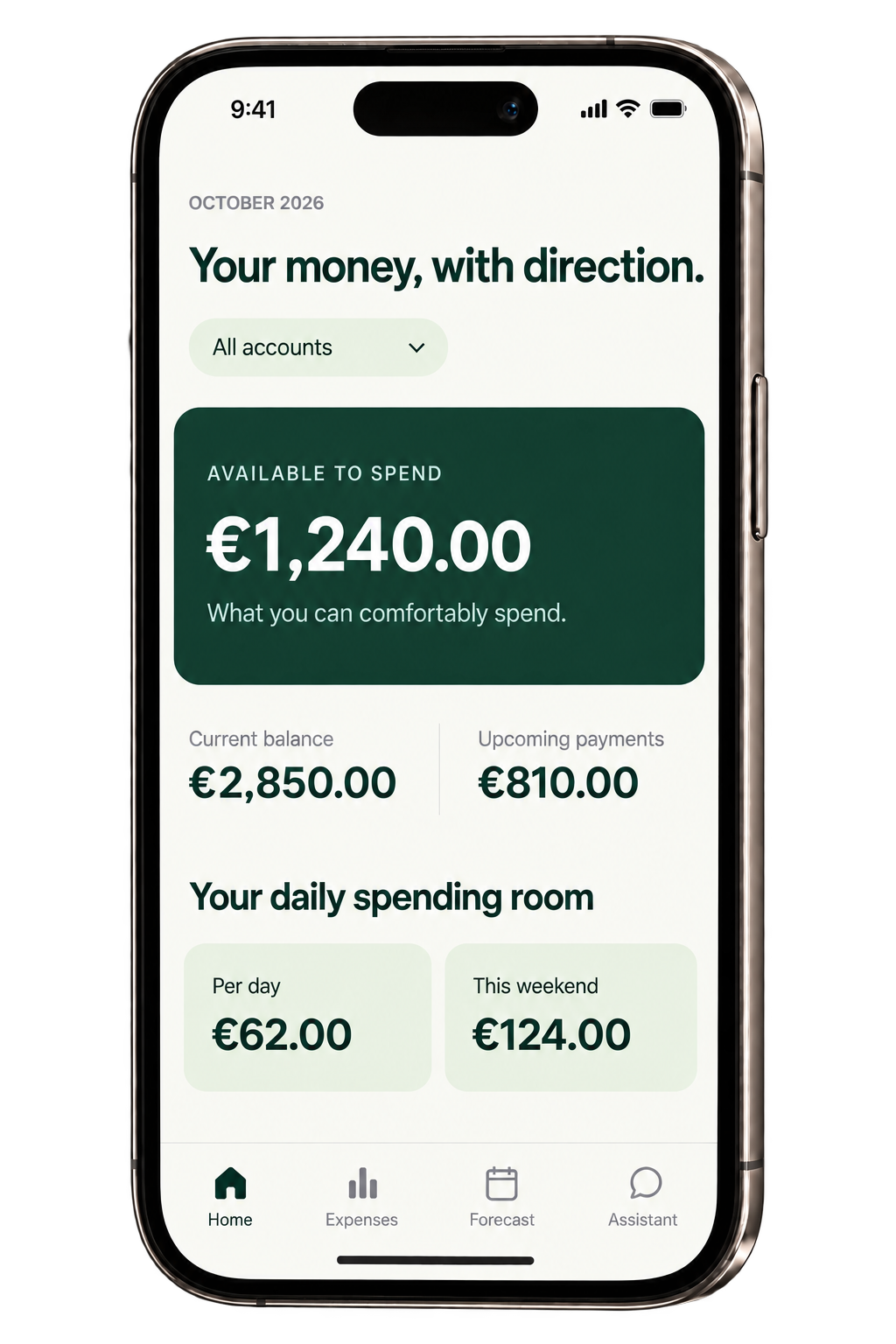
Illustrative view · fictional data
What you can spend, upcoming payments and your plans.
Everything you need to decide, in one place.
DESIGNED FOR YOUR IPHONE
It is about more than how much you have.
It is what you can put towards what comes next.
01 / WHAT YOU CAN REALLY SPEND
With upcoming payments already planned.
A clearer number to guide your decisions.
02 / WHAT COMES NEXT
Your goals and your safety buffer,
before you spend.
03 / IN YOUR HANDS
Your information lives on your iPhone.
You choose what happens next.
The scene could not be loaded.
Your balance also includes rent, subscriptions and that trip you are planning.
Entering every expense by hand takes time. A receipt or a bank file can make it quicker.
And your money is personal. That is why WIYLO starts and lives on your own iPhone.
From today’s balance, the app sets aside upcoming payments, your plans and savings goals, and the safety buffer you choose. You see what is really left to spend.
You can also see how expected income changes things, what you can spend each day and what your category budgets allow.
Try an example with fictional dataAdjust the buffer to see how your spending allowance changes.
This example simplifies the calculation. In the app, alerts warn you about possible negative balances and budgets at risk.
A LITTLE MORE PEACE OF MIND
You add. The app organises and forecasts.
You decide knowing what you can spend.
Scan a receipt, paste a screenshot, import a bank file or add an expense in a few taps.
Check each transaction before saving it. The app flags possible duplicates and remembers your categories.
Look 30, 90 or 180 days ahead. Simulate a purchase or make a savings plan while keeping your safety buffer in view.
Excel, ODS, CSV, PDF, OFX/QFX, QIF and Norma 43. Imported transactions do not adjust your balance by default; you can enable that option during review.
From the data you review to the information that helps you decide. Scroll to watch each transaction become a bar and a curve. Tap categories and explore the amounts.
Scroll to build the charts · Fictional data
Example accounts and amounts.
A personal account, a shared account and one for investments. View each balance separately or see them all together.
Plans, savings goals and the safety buffer apply to the total. Transfers between accounts are currently handled by editing balances.
Ask where you could adjust your spending or what has increased this month, using an AI provider you choose.
The assistant is available only when you connect your own API key for ChatGPT, Gemini, DeepSeek, Claude, Mistral or another compatible provider. Your question and the data you choose may be sent to that provider for processing. Cost and quality depend on the service you choose.
Every change is shown before it is saved.
You can confirm and undo.
By default, summaries are shared without merchant names. Transaction details are optional. Personal names are abbreviated to initials and you can mark names to hide them; the automatic filter may not detect every name. AI can make mistakes.
Create a €250 restaurant budget.
It will only be applied when you confirm.
Interactive example. It does not change your finances.
Suggestions respect the selected account.
Bulk deletions require double confirmation and authentication.
No app account, no ads and no server of our own storing your finances.
The database lives on your iPhone. iCloud sync is disabled.
Lock with Face ID, Touch ID or your passcode. Content is hidden in the app switcher.
AI keys are stored in the iPhone Keychain.
Text is recognised on your device. The receipt image is not kept.
A backup of the data store is made before every data migration. You can enable extra protection for exports and deletions.
Clear answers.
Financial data is stored on your iPhone. If you use an external AI API, the necessary information is shared with that service. With AI, summaries without merchant names are sent by default; details are optional. Personal names are abbreviated to initials and can be hidden, although the automatic filter may not detect every name.
You do not need a WIYLO account. Optional external services, such as an AI provider, have their own terms and credentials.
Not to record expenses, check what you can spend or plan ahead. To use the assistant, you do need to connect an AI provider with your own key. Cost and quality depend on the service you choose; the app does not include free AI.
No. Changes are suggested, shown and require your confirmation. You can undo them. Bulk deletions require double confirmation and Face ID.
You can import files from many banks: Excel, ODS, CSV, PDF, OFX/QFX, QIF or Norma 43. Direct bank connections are disabled in the current public version.
Yes. Each account has its own balance and you can filter by account or view the total. Plans, goals and the safety buffer apply to the total. Transfers between accounts are currently handled by editing balances.
Apple Vision reads the text on your iPhone. The app does not save receipt images.
Not by default: the balance you copy from your bank usually includes those transactions. You can enable balance adjustments when reviewing the import.
It is built for iPhone with iOS 17 or later. There is no Android or web version of the app. Cross-device iCloud sync is disabled.
A native app built with SwiftUI and SwiftData. Recognition with Apple Vision, charts with Swift Charts, widgets with WidgetKit and shortcuts with App Intents. Versioned schema, migrations with prior backups and automated tests.
The MCP server is disabled in the current public version.
The assistant can generate bar, line and pie charts and export them as PNG, PDF and CSV. The monthly report can also be exported as PDF.
WIYLO is a personal iPhone app installed through Xcode. As of October 2026, it is not published on the App Store.
Explore the app again ↑